I’m an employee at Nala
At Nala, you’ll find the necessary tools to manage your goals, receive feedback, send recognitions, and map a path for your professional growth within your organization.
What do you want to do today?
Quickly find the guide you need.
Explore by module
Frequently Asked Questions
How do I log in to Nala for the first time?
Follow these steps:
Go to Nala.
Choose the option that suits your email system:
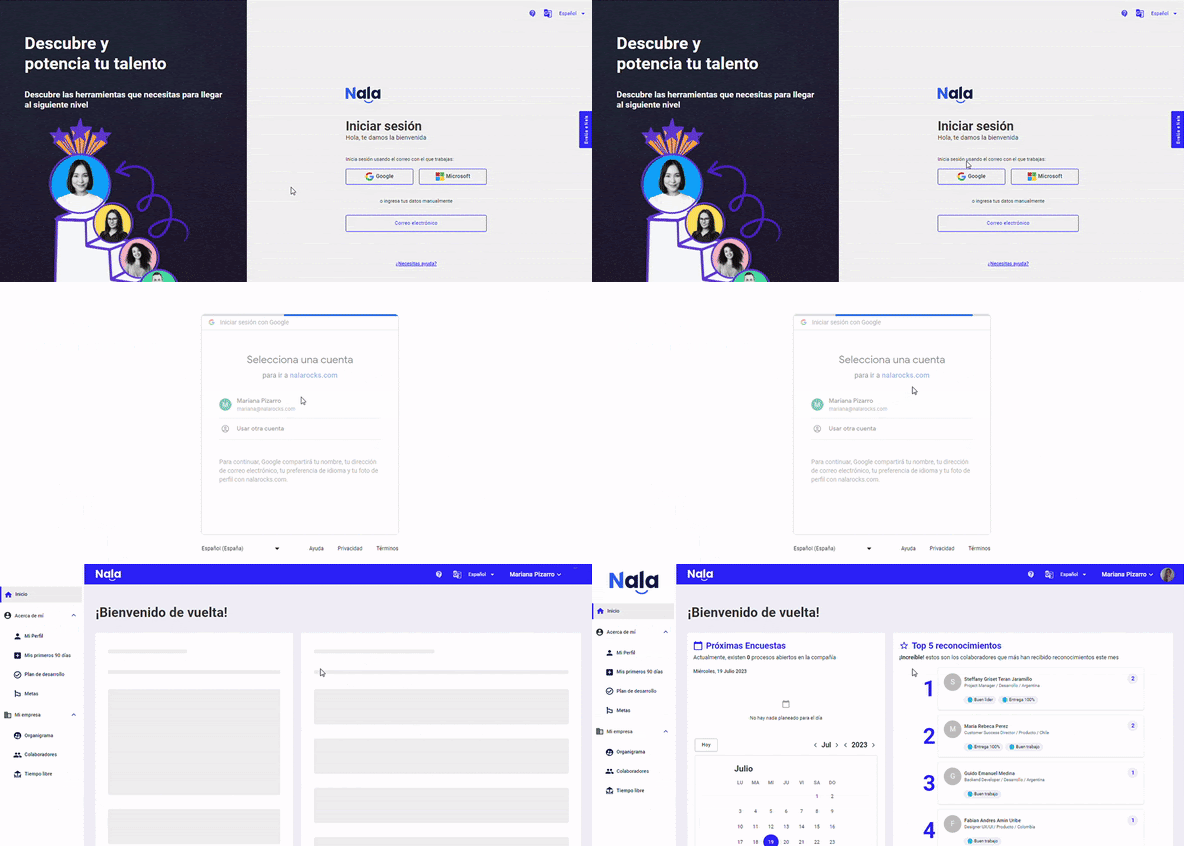
Option 1: Single Sign-On
Click this link and by directly clicking the Google or Microsoft options (depending on your email domain), log in as shown below:
Option 2: Email
This option lets you log in directly with your email server. If prompted for a password, use your email password.
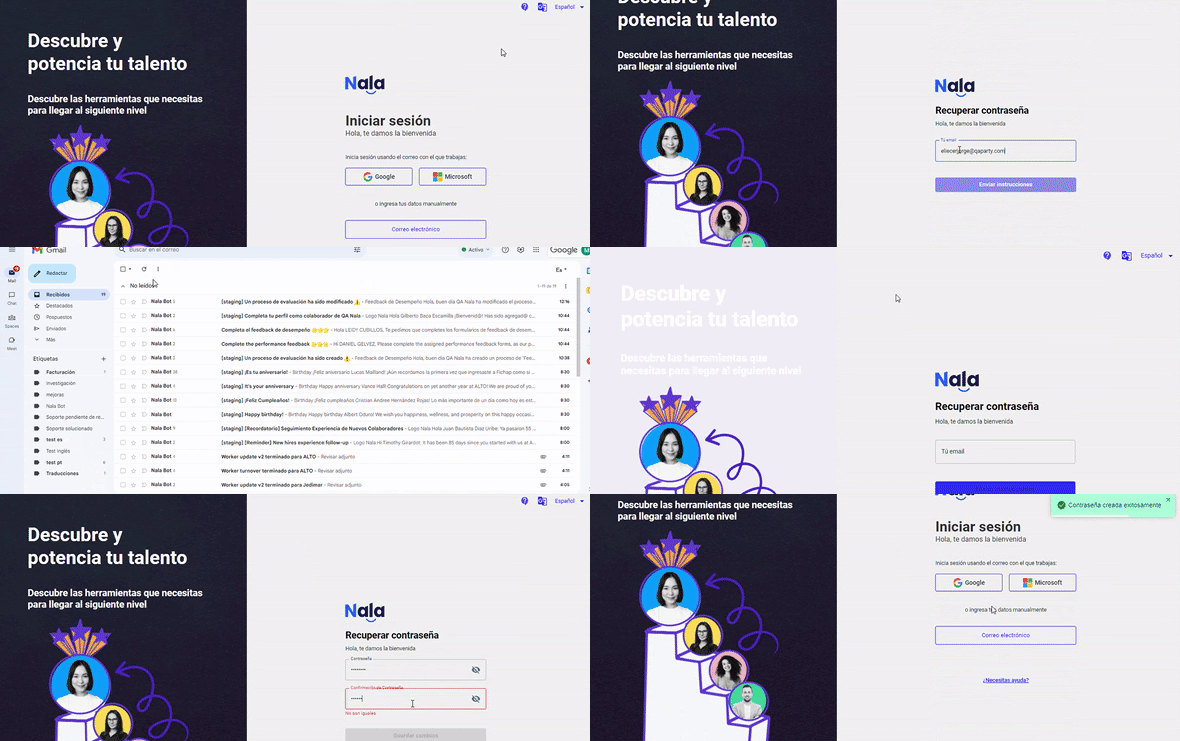
Create a password at this link using the email registered with Nala (the one where you receive surveys and reminders). Do it as shown below:
Keep in mind that if this is not your first time logging in and you previously selected the first option on your initial login, you won’t be able to create a password; you must continue signing in the way you did the first time.
How do I know what my registered Nala email is?
It’s the email where you receive Nala communications. If you need to change it, you must contactyour organization’s administrator.
What do I do if I forget my Nala password?
Follow these steps:
Go to Nala.
Select the "Email" button, then select "Request new password." You will receive an email with instructions to create your password, after which you can log in using the same button (email).
How do I update my email or other personal information in Nala?
To update your email, name, birth date, or other personal information, you must contact the Nala administrator in your organization (usually the human resources department). They will handle the necessary changes.
Feedback and recognitions
How does feedback work in Nala?
In Nala, any feedback you send is recorded privately. Only you and the person receiving the feedback can see it.
How can I send feedback or recognition in Nala?
Go to your profile in the "About Me".
Select "Feedback and Recognitions".
Click "Send Feedback and Recognitions" and choose the action you want to perform.
Recognition:
Select the employee using the search tool.
Write your recognition.
Choose the category that best aligns with the achievement.
Feedback:
Select the employee and choose the format:
Simple: Write clearly and constructively, defining the purpose of the feedback.
STOP/START/CONTINUE: Use this method to indicate what should stop, start, and continue.
How can I send feedback or recognition in Nala?
Go to your profile in the "About Me".
Select "Feedback and Recognitions".
Click "Send Feedback and Recognitions" and choose the action you want to perform.
Recognition:
Select the employee using the search tool.
Write your recognition.
Choose the category that best aligns with the achievement.
Feedback:
Select the employee and choose the format:
Simple: Write clearly and constructively, defining the purpose of the feedback.
STOP/START/CONTINUE: Use this method to indicate what should stop, start, and continue.
How are recognitions managed in Nala?
Recognitions in Nala are public. The entire organization can see who was recognized and why, fostering a positive and supportive culture.
Why should I use Nala to give feedback or recognition?
Because Nala helps you organize and channel this information effectively. Plus, it strengthens bonds among employees and encourages a positive, motivating work culture.
Both are powerful tools to:
Improve performance.
Increase motivation.
Strengthen work teams.
Reinforce organizational culture.
My Results
How can I view my personal results in Nala?
You can view your personal results by logging into Nala and selecting "My Profile" in the side menu. You’ll find cards labeled with the names of the surveys containing your results, such as:
Performance
Leadership
Just select the card that interests you. Doing so will open detailed information, including your results and recommendations, if any.
What if I change leaders during the survey?
If while answering the survey you notice that the leader shown for evaluation is not correct, you should contact your company’s Nala administrator (usually human resources). They will update the information on the platform. Once changed, wait for the next reminder email to evaluate the correct leader.
How can I know if I have pending surveys in Nala?
It’s very easy! Just log into your Nala account and go to the "Home" section. There you’ll find a calendar with survey scheduling. Just below it is a list of pending surveys with direct links to answer them.
Don’t forget to answer all assigned surveys and click "Submit" when finished.
My growth
My growth is the space in your profile where you record career expectations, follow their evolution and review agreements with your manager. You can use it without a development plan. It is available when enabled by your company.
Record or update my expectations
Open your profile and go to My growth. In My career expectations, describe what you would like to achieve and save your text. If you have already recorded expectations, update them to reflect your current interests.
When preparing your text, use the guiding questions about your aspirations for the next 12–24 months, feedback received, skills to strengthen and support or projects you need. These questions are guidance, not a mandatory questionnaire.
View the history
Review the current expectation and its date. Each update preserves the previous version with its author and date. The read-only history helps you follow how your expectations have evolved.
Review agreements with my manager
In Agreements with my manager, review agreements recorded by your direct manager, including their author, date and history. You record your expectations; your manager creates and updates agreements. Agreements can exist without a development plan.
Recording expectations or agreements does not automatically change your position, salary or project assignments.